






I approached Viator Tours & Attractions as a trip-planning tool rather than something I would open every day. That distinction matters. Its appeal is strongest when I have a destination in mind, a limited amount of time, and too many possible things to do. Instead of jumping between attraction websites, tour operators, and general search results, I can use one travel-focused place to browse experiences and tickets.
Viator is a free Travel & Local app from Viator, with an Everyone age rating. It has built a sizable audience, reaching over five million installs, and its average score sits at 4.9 from around eighty-one thousand ratings. Those figures suggest that it is not merely a novelty for people booking one holiday and deleting it afterward. My own view is more measured: it earns a place on my phone during active trip planning, and it can remain useful between trips if I travel often or like collecting ideas for future weekends.
What the first week feels like
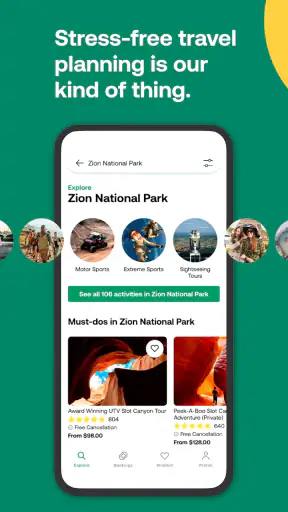
The first useful session is usually destination-led. I choose a city or region, then start comparing the kinds of experiences that are easy to overlook when planning from a map alone: guided visits, sightseeing activities, attraction admission, food-related outings, and other bookable plans. The app’s large catalogue is its main advantage, but it also creates the first challenge. A long list is helpful only when I have a way to narrow my priorities.
I found the app most effective when I began with a practical question instead of browsing aimlessly. “What can I do near my hotel on an afternoon?” is better than “Show me everything.” That approach turns the catalogue into a planning aid rather than an endless stream of possibilities. I can compare activities by location, timing, style, and the kind of day I want, then open the details that seem realistic.
The first-week appeal comes from reducing research friction. A standard web search often mixes official attraction pages, blog recommendations, advertisements, and outdated travel articles. Viator keeps the focus on experiences that can be considered as bookings. That does not remove the need to read carefully, but it gives me a more direct route from inspiration to an actual plan.
One of my favorite ways to use it is during the awkward middle stage of a trip itinerary. I may already know the major sights I want to see, but I still have a free morning or an unplanned evening. Searching specifically for that gap produces better results than rebuilding the entire holiday from scratch. It is also useful when I am traveling with someone whose interests differ from mine, because we can compare several types of activities without switching between unrelated services.
Turning browsing into a realistic itinerary
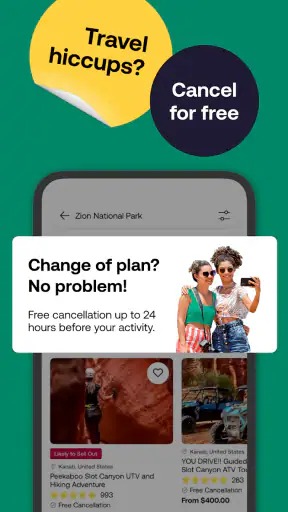
The important habit is to treat each listing as a proposal, not as an automatic addition to the schedule. I check the meeting point, duration, start time, cancellation terms, inclusions, and restrictions before deciding. A tour that looks perfect in a photo may be inconvenient if it starts across town, ends far from the next activity, or occupies more of the day than expected.
I also avoid stacking several bookable activities too tightly. The app makes it easy to become optimistic because every option is presented as a neat card in a list. Real travel includes transport delays, meals, queues, and the simple need to rest. Viator helps me find activities, but it does not replace the judgment needed to build a comfortable day.
A realistic example is a short city break where I land in the morning and have an open afternoon. I might use the app to find a flexible sightseeing option rather than reserve a long excursion immediately after arrival. If the activity requires a fixed meeting time, I leave enough space for baggage collection and transport. That small adjustment prevents one of the most common booking mistakes: treating an arrival day as if everything will run on schedule.
For a family, the same workflow becomes even more valuable. I look beyond the headline attraction and inspect age suitability, physical demands, duration, and what happens if one person needs a break. The Everyone rating describes the app’s general content suitability, not the suitability of every individual activity for every child. I still read the activity details as a parent or group organizer rather than assuming the app’s age label answers that question.
Where it beats the usual alternatives
Compared with searching through a general search engine, the app keeps the research closer to a transaction. I am not just reading that a museum or landmark exists; I am looking at ways to visit it or pair it with a guided experience. Compared with relying only on an official attraction website, it can be more convenient when I am comparing several different activities in the same destination.
That convenience has a trade-off. Official websites may be the better place to verify opening arrangements, special access rules, or the most direct admission option. A local operator’s own channel may also offer more context about the guide, route, or meeting process. I use Viator as a comparison and discovery layer, then read the final details with the same care I would use anywhere else.
It is less compelling for travelers who already have every day organized through a hotel concierge, a trusted local guide, or a small set of official sites. In that situation, another catalogue may add choices without adding clarity. The app is at its best when I need breadth and comparison, not when I already know the exact provider I want.
What remains useful after the novelty fades
Month-to-month value for different kinds of travelers
After the first trip, the recurring value depends on how I travel. Frequent travelers can keep it installed as a destination research tool, especially when planning several short breaks. I can browse a new place before booking flights, estimate how full an itinerary might become, and identify activities that deserve advance attention. That makes the app useful before the travel dates are even fixed.
For occasional travelers, the value is more seasonal. I may not open it for weeks, then use it heavily during one planning period. That is not a weakness by itself. Many travel apps are naturally episodic, and a tool does not need daily engagement to be worthwhile. The question is whether it saves enough time when the next trip arrives. In my experience, it does when I am comparing several destinations or coordinating a group.
I also see a quieter use case: keeping a shortlist of ideas for future trips. I can discover an unusual activity while researching one destination and use that style of experience to shape another itinerary later. The app becomes a source of prompts rather than a simple checkout utility. Still, I would not rely on it as a personal travel journal or a complete itinerary manager. Its lasting role is closer to a searchable marketplace for outings.
The catalogue is presented as containing more than three hundred thousand tours, experiences, and tickets. That scale is impressive, but it should change how I browse. I do not expect to inspect everything. I use filters, destination terms, and specific time windows to reduce the choice set. The larger the selection, the more important it becomes to define what “good” means before I start comparing.
Useful habits that improve the results
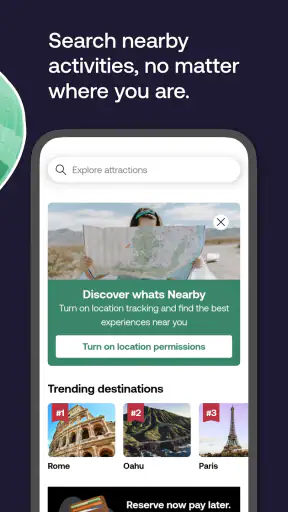
My first practical tip is to search by neighborhood or nearby landmark when possible. A destination name can return options spread across a wide area, while a more precise search helps reveal what actually fits into the day. I then check the meeting point on a map outside the emotional pull of the listing. An attractive activity is not a good choice if reaching it takes half the morning.
My second tip is to compare the total commitment, not just the activity title. A short-sounding tour may involve transport, check-in, and a return journey. I write down the real block of time in my itinerary, including a buffer. This is especially important for airport days, cruise stops, and visits with timed admission elsewhere.
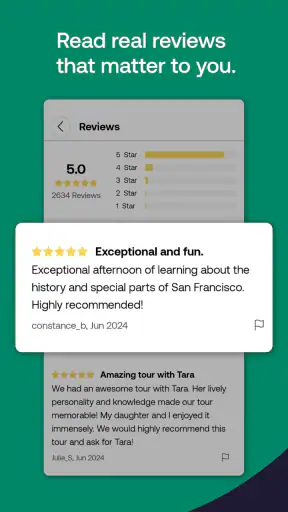
My third tip is to read the practical details before reviews influence me too strongly. Reviews can help me understand whether an experience feels rushed, well organized, or suitable for a particular group, but they do not replace checking the meeting location and inclusions. I use personal comments to identify patterns, then return to the listing’s actual conditions before booking.
A fourth useful workflow is to separate inspiration from commitment. During the early stage, I browse broadly and save or note possibilities. Closer to the trip, I reduce the list to activities that fit the route, budget, energy level, and weather expectations. This prevents the app’s abundance from turning into an itinerary full of reservations that leave no room for spontaneous decisions.
What maintenance really involves
The maintenance burden is not technical so much as organizational. I need to keep booking confirmations accessible, remember which activity belongs to which day, and recheck details when plans change. The app can help me discover and arrange experiences, but I still remain responsible for reading the conditions attached to each booking.
I would not install it and assume the work is finished after tapping a reservation button. Before traveling, I review start times, meeting instructions, names on the booking, and any requirements mentioned for the activity. On the day itself, I allow extra time to find the meeting point. This is not unique to Viator, but the app’s polished browsing experience can make the process feel simpler than it really is.
Storage space and update habits are also part of long-term use. The current version is 15.22.1 and requires iOS 11 or later. For someone using an older Apple device, that minimum requirement is worth checking before building a trip around the app. Keeping the app updated is sensible for compatibility and booking access, but I would still save important reservation information in a way I can reach if connectivity becomes unreliable.
The free price makes keeping it installed easy, especially for people who travel periodically. However, “free” applies to the app itself, not to the experiences I consider through it. I remind myself that the booking cost, transport, meals, and optional extras belong in the trip budget. This sounds obvious, yet browsing a large selection can encourage impulse additions.
Where fatigue starts
The biggest source of fatigue is choice overload. A large marketplace can make me feel productive while I am only scrolling. If I open the app without a destination, date range, or activity type in mind, I can spend more time comparing possibilities than making a decision. The cure is to arrive with a limit: one neighborhood, one free afternoon, or one type of experience.
Another source of friction is the gap between a compelling presentation and the practical reality of a booking. Photos and concise descriptions are useful for discovery, but they cannot tell me everything about crowds, walking pace, weather, accessibility, or the personality of a guide. I look for clues in the details and reviews, but I accept that marketplace information is not the same as personal local knowledge.
I also become cautious when an activity is central to a special occasion. For a birthday, anniversary, or once-in-a-lifetime visit, I want to understand the provider and the exact conditions more deeply. Viator may be a convenient route to finding the experience, but I do not let convenience replace verification. For low-stakes sightseeing, the trade-off is easy. For an expensive or irreplaceable day, I investigate further.
People who dislike advance planning may find the app less satisfying. Its strongest value appears before the activity, when comparing and reserving. A spontaneous traveler can still use it to find something nearby, but the catalogue is designed around making a considered choice. Likewise, travelers who want a single all-in-one navigation, accommodation, transport, and itinerary system may need other apps alongside it.
Who should keep it installed
I recommend keeping Viator on the phone if I travel several times a year, organize trips for family or friends, or prefer comparing guided activities in one place. It is particularly helpful when the destination is unfamiliar and I want more than a list of famous landmarks. The breadth gives me ideas, while the booking focus helps turn those ideas into possible plans.
I am more selective about recommending it to someone who takes one simple holiday and already knows exactly what they will do. If the plan is limited to an official attraction with a straightforward ticket, going directly to the attraction may be faster. If the priority is local spontaneity, asking a trusted resident or hotel staff member may produce a more personal answer. Viator is not automatically the best route for every travel decision.
It is also not the right sole tool for a complex expedition, a highly specialized accessibility need, or an itinerary where transport coordination is the main problem. In those cases, I would use it as one source of activities while relying on specialist advice and direct provider information for the parts where precision matters most.
My long-term verdict
After the initial excitement of browsing a new destination wears off, the app’s value becomes more practical. It does not need to become a daily habit. Its lasting space is justified when it shortens the search for bookable things to do, helps fill awkward gaps in an itinerary, and gives me a broad comparison point before I commit.
I appreciate that it is free to install and accessible to a wide audience, while the strong average rating and large number of users suggest that many travelers find the core experience dependable. I still keep my expectations realistic: the app can organize discovery, but it cannot guarantee that every activity will match my personal taste or eliminate the need to read conditions carefully.
My final judgment is positive, with one condition: use it deliberately. Start with a real travel problem, narrow the search, check the logistical details, and leave breathing room in the itinerary. When I follow that process, Viator Tours & Attractions earns lasting space as a reliable trip-planning companion rather than a one-time browsing distraction. Its best feature is not simply the size of its catalogue; it is the way that catalogue becomes useful when I apply my own limits and judgment.


